QR Code Billing
Modernize Your Invoicing
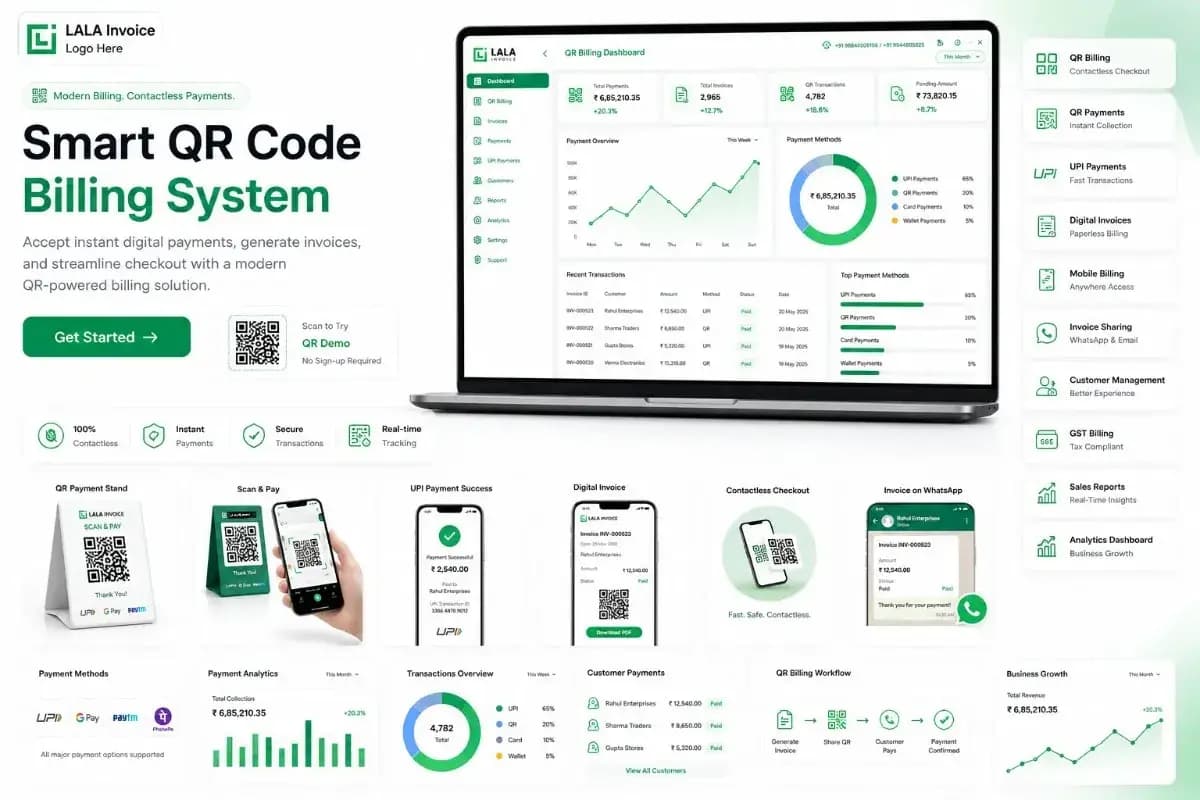
Generate QR codes for every invoice, allowing customers to view and pay bills instantly. Streamline your billing process with contactless payments, reduce errors, and improve cash flow with real-time payment tracking.
Instant Payments
Scan & pay
Zero Contact
Safe & secure
Fast Checkout
2-second scan
Bank-grade Security
Encrypted
Everything You Need for QR Code Billing Excellence
QR Code Generation
Generate unique QR codes for each invoice instantly.
Scan & Pay
Customers scan QR code to view and pay bills.
Secure Payments
Integration with multiple payment gateways.
Digital Invoices
Create and send professional invoices with QR.
Payment Analytics
Track payment patterns and transaction history.
Master QR Code Billing System
What is a QR Code Billing System?
A QR code billing system is a modern digital invoicing solution that generates unique QR codes for each invoice or bill. When customers scan the QR code using their smartphone camera, they're instantly directed to a secure payment page where they can view the invoice details and complete the payment. This system eliminates the need for manual data entry, reduces billing errors, and provides a contactless, frictionless payment experience for both businesses and customers.
The QR code contains encoded invoice information such as invoice number, amount, and business details. When scanned, it triggers a payment request through integrated payment gateways, making the entire billing process from invoice generation to payment completion seamless and automated.
How to Use a QR Code Billing System
Generate QR Invoice
Create an invoice using billing software. The system automatically generates a unique QR code for that invoice.
Share with Customer
Send the QR invoice to customers via email, WhatsApp, SMS, or print it on physical bills.
Customer Scans QR
Customers scan the QR code using their smartphone's camera or a QR reader app.
View & Pay
Customers view the invoice details on their phone and complete payment securely through integrated payment gateways.
Instant Confirmation
Both parties receive immediate payment confirmation. The system updates invoice status automatically.
Track Payments
Monitor all QR-based payments, transaction history, and pending invoices from your dashboard.
Why Businesses Need QR Code Billing
- Reduce Billing Errors: Automate invoice generation and reduce manual entry mistakes.
- Speed Up Payments: Instant payment processing with just a scan.
- Improve Customer Experience: Offer modern, contactless payment options.
- Reduce Cost: Eliminate paper invoices and manual processing costs.
- Real-time Tracking: Monitor payment status instantly from any device.
- Better Cash Flow: Faster payments lead to improved working capital.
- Competitive Advantage: Modern billing solutions attract tech-savvy customers.
- Easy Reconciliation: Automated payment matching simplifies accounting.
Key Benefits of QR Code Billing System
Contactless Payments
Enable safe, touch-free transactions that reduce physical contact and improve safety.
Instant Payment Processing
Reduce payment delays from days to seconds. Get paid instantly when customers scan and pay.
Reduced Billing Errors
Automated QR code generation ensures accurate invoice details, minimizing human error.
Cost Savings
Eliminate printing, mailing, and manual processing costs with digital QR invoices.
Improved Cash Flow
Faster payment collection improves working capital and reduces days sales outstanding.
Enhanced Customer Experience
Modern, convenient payment options that customers appreciate and prefer.
Important Components of a QR Code Billing System
QR Code Generator
Creates unique, scannable QR codes for each invoice with encoded payment information.
Invoice Management
Create, send, and track invoices with automated QR code attachment.
Payment Gateway Integration
Secure payment processing through popular gateways like UPI, cards, and net banking.
Customer Dashboard
Centralized view of all QR invoices, payment history, and outstanding balances.
Payment Notifications
Real-time alerts for successful payments, failed transactions, and overdue invoices.
Analytics & Reporting
Track payment patterns, revenue trends, and customer behavior through detailed reports.
Security & Encryption
Bank-grade encryption to protect payment data and customer information.
Multi-Platform Support
Works across web, mobile, and POS systems for maximum flexibility.
How QR Code Billing Helps in Financial Analysis & Decision-Making
Real-time Revenue Tracking
QR code payments provide instant visibility into revenue streams. Finance teams can monitor daily collections, identify top-performing products or services, and adjust pricing strategies based on payment trends.
Customer Payment Behavior Analysis
Track how different customer segments pay – preferred payment methods, payment timing, and frequency. This data helps tailor payment options and improve customer retention strategies.
Cash Flow Forecasting
With real-time payment data, you can build more accurate cash flow forecasts. Know exactly when to expect payments and plan for upcoming expenses with greater confidence.
Revenue Recognition
Automated payment matching ensures revenue is recognized at the right time. This improves financial reporting accuracy and ensures compliance with accounting standards.
Cost Reduction Analysis
Compare costs of QR billing vs. traditional methods. Track savings from reduced paper usage, manual processing, and faster payment cycles to justify and optimize investments.
Strategic Decision Support
Data-driven insights from QR billing help identify growth opportunities, optimize pricing, and allocate resources more effectively. Leadership can make informed decisions based on actual transaction patterns and customer behavior.
Best Practices for Maintaining an Effective QR Code Billing System
Regular QR Code Testing
Test QR codes regularly to ensure they link to correct invoices and payment pages. Update any expired or broken codes immediately.
Keep Payment Methods Updated
Maintain integration with popular payment gateways and update UPI IDs, bank account details, and payment options as needed.
Monitor Payment Analytics
Regularly review payment reports to identify trends, late payments, and successful payment methods for optimization.
Ensure Security Compliance
Stay compliant with PCI DSS and other security standards. Regularly update security protocols to protect payment data.
Provide Customer Support
Offer quick support for scanning issues, payment failures, or invoice inquiries. Clear communication builds trust.
Regular System Updates
Keep your QR billing software updated with the latest features, security patches, and payment gateway integrations.
Understanding QR Code Billing System Growth
QR code billing systems are experiencing rapid adoption across industries as businesses embrace digital transformation. The global QR code payment market is projected to grow significantly, driven by increased smartphone penetration, contactless payment preferences, and the need for efficient billing solutions.
Smartphone Penetration
Growing smartphone adoption makes QR scanning accessible to more users.
Contactless Trend
Post-COVID, contactless payments are preferred for safety and convenience.
Digital India Initiative
Government push for digital payments accelerates QR adoption.
Cost Efficiency
Businesses adopting QR billing reduce costs and improve operational efficiency.
Better User Experience
Simpler, faster checkout increases customer satisfaction.
Data Insights
QR billing provides valuable transaction data for business intelligence.
01. What is QR Code Billing System?
A QR Code Billing System is a digital invoicing solution that generates unique QR codes for each invoice. Customers scan the QR code with their smartphone to view invoice details and make secure payments instantly. This system automates the entire billing process, from generation to payment confirmation, reducing manual effort and errors.
02. How QR Code Billing Works?
The system generates a unique QR code for each invoice that encodes payment information. When customers scan the code, they're directed to a secure payment portal where they can review the invoice, choose a payment method, and complete the transaction. Payment confirmation is instant, and both parties receive notifications.
03. Benefits of QR Code Billing
QR code billing offers numerous advantages: contactless payments for safety, instant processing for better cash flow, reduced errors through automation, cost savings from eliminating paper and manual processing, improved customer experience with modern payment options, and valuable data insights for business intelligence.
04. Implementation Best Practices
Successful QR billing requires: regular testing of QR codes, updating payment methods, monitoring analytics for optimization, ensuring security compliance, providing customer support, and keeping the system updated with new features and security patches.
✓ QR code billing systems are revolutionizing how businesses manage invoices and payments, enabling faster payments, better customer experiences, and improved financial management.