Billing Software
with Barcode Scanner
Streamline your billing process with our free billing software featuring built-in barcode scanning. Generate professional invoices, track inventory in real-time, and manage customer relationships—all from one intuitive platform designed to accelerate your business operations.
Free Forever
No hidden charges
Barcode Scanner
Instant scanning
Inventory Sync
Real-time updates
Secure Data
Encrypted storage
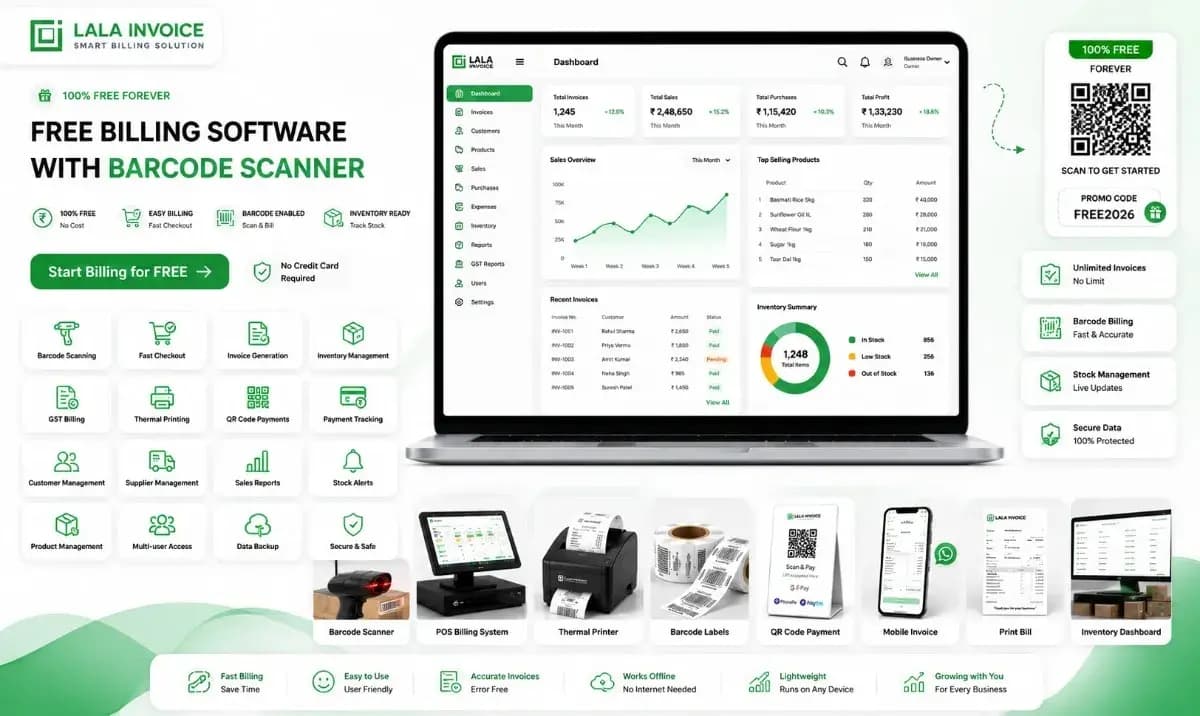
Everything You Need for Efficient Billing & Inventory Management
Barcode Scanner
Scan products instantly for fast billing and inventory tracking.
Generate Invoices
Create professional invoices with automatic calculations.
Inventory Management
Track stock levels and get low-stock alerts automatically.
Sales Reports
Generate detailed reports for business insights.
Customer Management
Store customer data and track purchase history.
Streamline Your Business with Smart Billing Solutions
Free billing software with barcode scanner is a comprehensive business solution that combines point-of-sale (POS) functionality with inventory management and customer relationship tools. It allows businesses to create professional invoices, track sales, monitor stock levels, and manage customer data—all through an intuitive interface that integrates seamlessly with barcode scanning technology for rapid product identification and billing.
Whether you run a retail store, restaurant, wholesale business, or service center, this software eliminates manual data entry, reduces billing errors, and accelerates checkout processes. The barcode scanner integration enables instant product lookup, automatic price retrieval, and real-time inventory updates, making it an essential tool for businesses of all sizes looking to optimize their operations and enhance customer experience.
How to Use Free Billing Software with Barcode Scanner
Set Up Your Product Catalog
Add your products or services to the system with their prices, descriptions, and barcodes. You can manually enter details or import them from spreadsheets.
Configure Barcode Scanner
Connect your barcode scanner device or use the mobile camera scanner. The software automatically maps scanned barcodes to your product catalog.
Create Invoices with Scanning
Scan products as customers add them to their cart. The software automatically retrieves prices, applies discounts, and calculates totals in real-time.
Manage Inventory & Customers
Track stock levels automatically as sales are made, receive low-stock alerts, and maintain customer profiles with purchase history for personalized service.
Why Your Business Needs Free Billing Software with Barcode Scanner
Implementing a billing software with barcode scanning capability addresses critical business challenges:
- Eliminate Manual Data Entry: Barcode scanning automates product lookup, reducing errors and saving time.
- Accelerate Checkout Process: Reduce transaction times significantly with instant product identification.
- Real-time Inventory Tracking: Update stock levels automatically with every sale made.
- Professional Invoicing: Generate polished invoices that enhance your brand image.
- Prevent Stockouts: Receive alerts when inventory levels fall below thresholds.
- Enhance Customer Experience: Faster billing with accurate pricing improves satisfaction.
- Detailed Sales Analytics: Access comprehensive sales data for better decision-making.
- Reduce Billing Errors: Eliminate pricing mistakes with automated calculations.
Key Benefits of Free Billing Software with Barcode Scanner
Time Efficiency
Scan products in seconds instead of manually searching for prices, reducing transaction time by up to 70%.
Cost Savings
Free to use with no hidden fees, saving your business thousands in software licensing costs annually.
Error Reduction
Eliminate manual entry errors with automated data retrieval through barcode scanning.
Inventory Accuracy
Maintain accurate stock levels with automatic updates on every transaction.
Professional Branding
Create branded invoices and receipts that build trust and credibility with customers.
Data-Driven Insights
Access detailed sales reports and analytics to optimize pricing and inventory decisions.
Important Components of Free Billing Software
Barcode Scanner Module
Integrated scanning technology that identifies products instantly, retrieves pricing data, and updates inventory in real-time.
Invoice Generator
Create professional invoices with automatic calculations, tax handling, discount applications, and multiple currency support.
Inventory Management
Track stock levels, set reorder points, manage suppliers, and monitor product movement across multiple locations.
Sales Dashboard
Visualize key metrics including daily sales, top-selling products, revenue trends, and payment statuses.
Customer Management
Maintain customer profiles, track purchase history, manage loyalty programs, and send targeted communications.
Payment Processing
Accept multiple payment methods including cash, cards, digital wallets, and UPI with automatic reconciliation.
How Billing Software Enhances Financial Analysis
Free billing software with barcode scanner provides comprehensive data that enables sophisticated financial analysis:
- Revenue Analysis: Track revenue streams across different product categories, time periods, and sales channels. Identify which products generate the most income and optimize your inventory accordingly.
- Cost Management: Monitor cost of goods sold (COGS) alongside sales data to understand profit margins on individual products and identify opportunities for cost optimization.
- Cash Flow Visibility: Gain real-time insights into cash inflows from sales and outflows for inventory purchases, helping you maintain healthy cash flow levels.
- Performance Metrics: Calculate key performance indicators including average transaction value, customer acquisition cost, and inventory turnover rate to measure business health.
Best Practices for Maintaining Accurate Billing Software
Regular Database Updates
Keep your product catalog updated with accurate prices, descriptions, and barcode information to ensure seamless scanning.
Inventory Reconciliation
Conduct regular physical counts and reconcile them with system data to maintain inventory accuracy.
Backup Data Regularly
Implement automated backups to protect your billing data and ensure business continuity.
Train Staff Thoroughly
Ensure all team members understand how to use the barcode scanner and billing features effectively.
Monitor System Performance
Regularly check the software for updates and performance issues to maintain optimal functionality.
Review Analytics Monthly
Analyze monthly reports to identify trends, opportunities, and areas requiring attention.
Understanding Billing Software Growth
The adoption of billing software with barcode scanning has grown significantly as businesses recognize its transformative impact on operations. This growth is driven by technological advancements, increased smartphone penetration, and the need for real-time business intelligence. Modern billing solutions leverage cloud computing, mobile accessibility, and integration with other business systems to provide comprehensive management tools that scale with business growth.
Mobile Accessibility
Access your billing system from anywhere using mobile apps that leverage device cameras for barcode scanning.
Cloud Integration
Store data securely in the cloud, enabling real-time synchronization across multiple devices and locations.
AI-Powered Insights
Advanced analytics use machine learning to predict inventory needs, customer preferences, and optimal pricing.
IoT Integration
Connect with smart devices and sensors for automated inventory tracking and supply chain optimization.
Understanding Billing Software for Business Growth
A billing software with barcode scanner is an essential tool for modern businesses, combining point-of-sale functionality with advanced inventory management and customer relationship capabilities. Beyond basic invoicing, this software provides real-time business intelligence through automated data collection and analytics. The barcode scanner integration eliminates manual data entry, reduces errors, and accelerates the entire billing process, while the comprehensive dashboard offers instant visibility into sales performance, inventory levels, and customer behavior.
01. Understanding Barcode Scanning Technology
Barcode scanning technology converts product codes into digital data instantaneously. When integrated with billing software, it enables businesses to identify products, retrieve pricing information, and update inventory levels with a single scan. This technology reduces human error, speeds up checkout processes, and provides accurate data for inventory management and sales analysis.
02. The Role of Billing Software in Business Operations
Billing software serves as the central nervous system of retail operations, managing everything from product cataloging and inventory tracking to customer management and financial reporting. It automates routine tasks, provides operational visibility, and generates insights that help businesses make informed decisions about pricing, promotions, and inventory optimization.
03. Financial Benefits of Billing Software
By automating the billing process and integrating with barcode scanning, businesses can significantly reduce operational costs associated with manual data entry, billing errors, and inventory mismanagement. Additionally, features like discount management, loyalty programs, and bulk billing help businesses optimize pricing strategies and maximize revenue while improving cash flow through faster payment processing.
04. Data-Driven Decision Making
Modern billing software collects vast amounts of transactional data that can be analyzed to identify trends, customer preferences, and business opportunities. Advanced analytics features provide insights into peak selling hours, seasonal demand patterns, product performance metrics, and customer buying behaviors, enabling data-driven decisions that drive growth and profitability.
05. Choosing the Right Billing Software
When selecting billing software for your business, consider factors like scalability, ease of use, barcode scanner compatibility, reporting capabilities, and integration options with other business systems. Free billing software provides an excellent starting point for small businesses, offering essential features without initial investment, while allowing businesses to upgrade as they grow.
✓ Adopting free billing software with barcode scanner is a strategic decision that can transform your business operations, improve customer satisfaction, and drive sustainable growththrough efficient, data-driven management.